
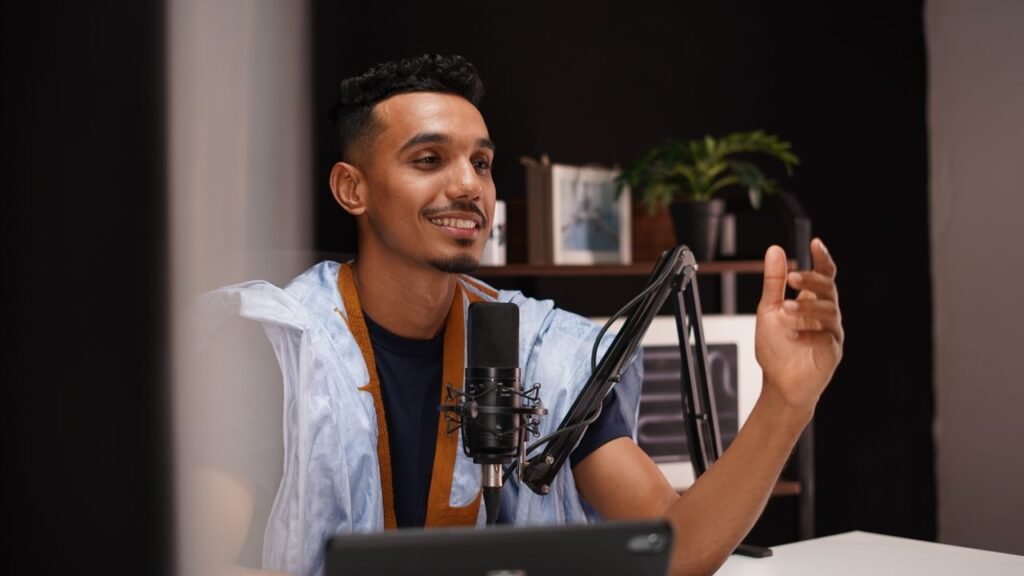
Starting a podcast looks complicated from the outside: microphones, hosting, feeds, directories, editing software. In practice it is a short chain of simple steps. A podcast is an audio show, published as a series of episodes, that listeners can play whenever they like. What makes it a podcast rather than a pile of audio files on a website is the feed — a single link that tells every podcast app where your show lives and when a new episode appears. Understand that feed, and the rest falls into place.
First, decide what the show is
Every practical decision that follows depends on this one. A podcast that tries to cover everything ends up covering nothing. Pick one subject you can talk about for twenty episodes, and one kind of listener you are talking to.
Then choose a format. The common shapes are the solo show, the interview show, the co-hosted conversation, and the narrative or documentary show, told with recorded scenes and narration. A solo show is the simplest to schedule. A narrative show takes the most editing time by far — and if that style appeals to you, our guide to what a documentary is and how documentaries are made explains how the storytelling behind it works.
Length and frequency matter more than most beginners expect. Pick a rhythm you can honestly keep for six months — a missed schedule loses listeners faster than a modest one. Record two or three episodes before you publish anything, so a slow week never leaves you with nothing to release.
The minimum kit
You need less gear than the internet suggests. At minimum, a podcast needs a microphone, a pair of headphones, something to record on, and a quiet room. A phone can record a first episode, and plenty of shows started exactly that way. A dedicated USB microphone is the usual first upgrade, but it is an upgrade, not a requirement.
Headphones matter more than beginners realise. Without them, sound from your speakers can leak back into the microphone, and you cannot hear the buzz or the echo until it is too late.
The room is the part people skip, and it is the part listeners notice most. Hard, empty rooms make voices echo. A small room with soft furnishings — curtains, a rug, a wardrobe full of clothes — absorbs that echo and makes a modest microphone sound far better. Test each room with a thirty-second recording, and turn off anything that hums: fans, fridges, air conditioning. Sit about a hand’s width from the microphone and keep that distance steady.
Recording basics
Keep a backup of the raw recording before you edit anything. If you are recording with a guest over the internet, record each voice on its own track if you can — it makes editing out a cough or a barking dog ten times easier.
Do a sound check every time. Record ten seconds, play it back, and check three things: is your voice clear and loud enough, is there background noise, and is anything distorting? Distortion — the harsh crackle when a voice is too loud for the microphone — cannot be fixed afterwards, so set your level a little lower than you think you need.
Speak a little more slowly than feels natural, and leave pauses between thoughts. Listeners need those pauses: they are where the last sentence lands. If you stumble, stop, take a breath, and say the sentence again from the start. Keep your notes short — bullet points, not a script read aloud.
Editing basics
Editing is where a rambling recording becomes a show. The goal is not perfection: it is to remove what gets in the way of listening — long silences, repeated false starts, interruptions, loud breaths. Cut the mistakes, tighten the gaps, and stop. Over-editing makes a host sound like a robot, and listeners notice.
Free audio-editing software is available for Windows, Mac and phones, and it is more than capable for a first show. Learn five operations and ignore the rest until you need them: cut, fade in and out, adjust volume, remove background noise, and export. Export as an MP3 — the format every podcast platform accepts — and check that it plays from start to finish before you upload it. Keep a simple template for each episode: the same opening, the same closing line, the same place for the show notes.
Hosting and the RSS feed
This is the step that confuses almost everyone, and it is simpler than it sounds. A podcast host is a service that stores your audio files and creates your RSS feed — a single web address that lists your show, its episodes, its cover art and its description in a format podcast apps can read. When you publish a new episode on your host, the feed updates, and every app that follows your feed picks up the new episode automatically. You upload once; the feed does the distribution.
Apple Podcasts does not store your episodes. It is a directory and a player: it reads your RSS feed and lists what it finds. The same is true of most listening apps, which is why you need a host before you can appear anywhere. What matters at the start is that the host gives you an RSS feed you control and lets you move your show elsewhere later.
Spotify works a little differently, because it is both a listening app and a host. Spotify for Creators is Spotify’s free hosting and creation platform: a show hosted there is published to Spotify automatically, and you can find its RSS feed in the dashboard under Settings, then Availability, to submit to other apps yourself.
Getting listed on Apple Podcasts, Spotify and YouTube
Submitting your show is a one-time job for each platform. For Apple, the process runs through Apple Podcasts Connect, Apple’s website for podcasters. Sign in with an Apple Account, choose to add a show with an RSS feed, paste your feed address, and submit for review. Apple checks the feed, the cover art and the show details, and reviews usually take hours to a few days. Cover art must be square, between 1400 and 3000 pixels on each side, saved as a JPG or PNG with no transparency, and your feed must contain at least one published episode. Apple does not charge to list a standard free podcast.
For Spotify, you either host with Spotify for Creators, in which case publishing is automatic, or you submit your RSS feed manually and verify ownership through a code sent to the email address in your feed. For YouTube, film your episodes and upload them as videos in a playlist set up as a podcast, or connect your RSS feed in YouTube Studio and let YouTube turn each episode into a video using your show art. YouTube’s help pages note that audio uploaded through the RSS route cannot contain advertisements. Do not submit the same show twice through different routes — a duplicated listing splits your followers and reviews between two entries, and fixing it is slow.
How new shows find listeners
Here is the honest part: publishing a podcast does not bring listeners, and nobody can promise you an audience size or an income — anyone who does is selling something. What works, slowly, is a combination of four things.
First, make the show easy to find and easy to try. Write a clear title, a description that tells a stranger why they should listen in one sentence, and episode titles that describe the episode rather than teasing it.
Second, tell people who already know you. Friends, colleagues, a mailing list, a community you belong to — your first listeners will come from somewhere you already exist. Ask them for honest feedback, and ask them to leave a rating or a review if they genuinely liked it.
Third, appear on other shows. Guesting on a podcast with a similar audience is the most reliable way for a new show to be discovered, because its listeners already like this kind of thing. Offer something useful to the host’s audience, not just a plug for your own show.
Fourth, keep going. Most podcasts stop before episode ten, and the shows that survive are the ones whose hosts treated the first twenty episodes as practice. Publish on the schedule you promised, improve one small thing each episode, and let the catalogue build.
Common questions
Do I need a website? Not to start, but it helps. A simple page with your show description and episode list gives listeners somewhere to land. Many hosts provide a basic show page automatically.
How long should an episode be? As long as the material needs and no longer. Interviews often run 30 to 60 minutes; solo shows often run 15 to 30.
Can I use music in my podcast? Only music you have the rights to use — your own, royalty-free music, or music licensed for podcasting. Using a commercial song without permission can get your episode removed.
Should I record video too? Only if you want to. Video adds work, and most podcast listening is audio-only. Some shows film their recordings and publish the video on YouTube as a second version. If that appeals to you, our guide to how movies are made, from script to screen is a useful primer on the production side.
When can I make money from a podcast? There is no fixed point. Some shows earn through sponsorships or subscriptions once they have a steady audience; many never earn anything. Treat income as something that may follow an audience, never as something to count on first.
The bottom line
Starting a podcast takes one decision, one quiet room, one microphone, and one feed. Decide what the show is and who it is for. Record a few episodes before you publish. Put the audio on a host, submit the feed to Apple Podcasts, Spotify and YouTube, then publish on schedule and improve one thing at a time. The technology is the easy part. The show is the work — and it is work almost anyone can start this weekend.
Sources verified 14 November 2026: Spotify for Creators guide to starting a podcast — free hosting for everyone; episodes hosted with Spotify for Creators publish to Spotify automatically; RSS feed found under Settings, then Availability, for submission to other platforms; RSS.com guide to submitting a podcast to Apple Podcasts — Apple Podcasts lists shows by reading the RSS feed; submission through Apple Podcasts Connect; at least one published episode required; review usually within hours to a few days; Apple Podcasts cover art and submission requirements — square cover art between 1400 and 3000 pixels, JPEG or PNG; Apple reviews new shows before listing; YouTube Help on delivering podcasts using an RSS feed — RSS feed connected in YouTube Studio; YouTube creates a static-image video from show art for each episode; podcast content uploaded this way cannot contain advertisements.