
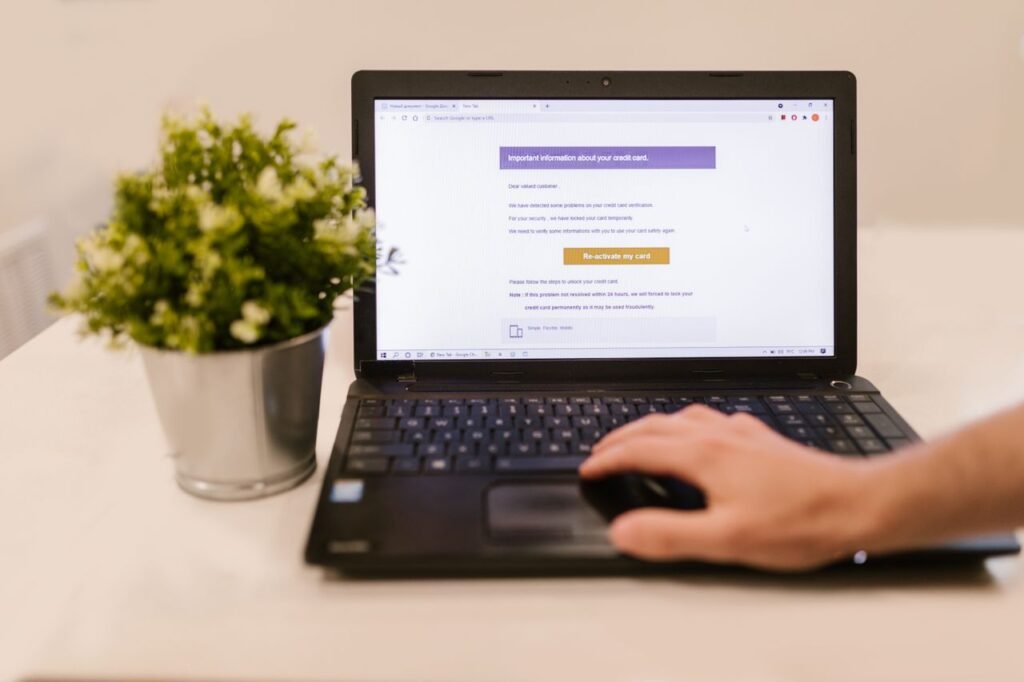
The short answer
A phishing email is a fake message designed to look like it comes from someone you trust — your bank, a delivery company, your employer, a streaming service — in order to trick you into clicking a link, opening an attachment, or handing over a password or payment details. The name comes from “fishing”: the scammer casts a wide net and waits for someone to bite. Spotting one is a skill, not a talent, and it comes down to a short checklist you can run in ten seconds: check the sender, read the message for pressure and odd details, hover over the link before you click, and never trust an unexpected request for sensitive information. This guide covers the signs, the checks, and exactly what to do if you clicked — plus where to report the message in the USA, the UK, Australia, and Canada.
How phishing works
Phishing works because it copies the familiar. A scammer sets up a website that looks like your bank’s login page, or sends an email that copies a real company’s logo, colours, and wording. The message then creates a reason to act now: your account will be closed, a parcel cannot be delivered, a payment failed, an invoice is overdue. The link in the message takes you to the fake page, where anything you type — username, password, card number — goes straight to the criminal.
The scale is large. The UK’s National Cyber Security Centre reports that it had removed 454,800 scam web addresses as of July 2026, through reports sent to its suspicious email service. Every one of those addresses was a trap waiting for a click.
The seven signs of a phishing email
- The sender address does not match the company. This is the single most useful check. The display name may say your bank, but the real address behind it may be something else entirely — a free webmail address, a misspelled company name, or a domain from a different country. Always expand the sender field to see the full address, and compare it with the address on the company’s real website. A genuine message from a bank will not come from a random personal email account.
- Urgency and threats. “Your account will be closed in 24 hours.” “Immediate action required.” “Your parcel will be returned.” Scammers use fear and time pressure to stop you thinking. Real companies do give deadlines, but they rarely threaten to close your account by email alone, and they do not demand that you click a link this minute.
- An unexpected attachment or link. Were you expecting this email? If a delivery company writes to you about a parcel you never ordered, or a colleague sends an invoice you never discussed, treat it as suspicious until proven otherwise. Attachments are the riskiest part: a document or zip file can carry malware that installs itself when opened.
- Generic greetings and sloppy details. “Dear customer” instead of your name is a warning sign, because a real company that knows you usually uses your name. Spelling mistakes, odd grammar, and a logo that looks slightly wrong are also clues — though the best phishing emails are now well written, sometimes with the help of AI, so clean spelling no longer proves a message is safe.
- Requests for sensitive information. No honest organisation will email you asking for your password, your full card number, your PIN, or a one-time passcode. Your bank will never ask for those by email. Neither will a government department, a delivery firm, or a streaming service. Any email that asks for them is a scam, whatever logo it carries.
- A link that goes somewhere unexpected. Before you click, hover your mouse over the link — or press and hold it on a phone — to see where it really leads. A link that claims to go to your bank but points to a strange domain, a shortened link, or a web address with extra words tacked on is a fake.
- Something feels off. Trust that feeling. If a message is slightly wrong in a way you cannot quite name — the tone is off, the request is odd, the timing makes no sense — stop and check it another way. That instinct is worth more than any single technical check.
The ten-second check before you click
Make this a habit for every unexpected email that asks you to do something:
- Look at the sender’s full address. Does the domain match the real company?
- Ask whether you expected this message. Did you order a parcel, request a password reset, or owe this invoice?
- Hover over the link. Does the address it points to belong to the real company?
- Read it once more, slowly. Urgency, threats, and requests for passwords are all red flags.
- If in doubt, do not click. Go to the company’s website or app yourself — type the address in, or use a bookmark — and check there.
What to do instead of clicking
If an email claims there is a problem with an account, a delivery, or a payment, the safe route is always the same: ignore the link and go to the source directly. Open the company’s app on your phone, or type its web address into your browser yourself. If there really is a problem, it will be visible there. If there is no problem, the email was a fake.
If the message claims to come from a person you know — a colleague, a friend, a boss asking you to buy gift cards or transfer money — contact that person through a different channel before you act. Send them a text, call them, or speak to them in person. Email accounts get hacked, and scammers use stolen accounts to send convincing requests to the victim’s contacts.
Never reply to a suspicious email, and never download its attachments. Replying confirms that your address is active, which invites more scams. Downloading an attachment can install malware that steals passwords or locks your files.
If you already clicked or replied
Do not panic, but act quickly. Speed matters, because the first hour is when most of the damage can still be prevented.
Change your passwords immediately. Start with the account the phishing email was targeting, then any other account that shares the same password. Use a strong, unique password for each one, and store them in a password manager rather than reusing them. Our guide to what a password manager is and how it works explains how to set one up.
Turn on two-factor authentication. Wherever it is offered, switch it on, so a stolen password alone is not enough for an attacker to get in. Our guide to what two-factor authentication is and how to turn it on walks through it step by step.
Contact your bank if money or card details were involved. Call the fraud number on the back of your card and tell them what happened. They can freeze the card, reverse a payment if it is still possible, and watch for suspicious activity. The sooner you call, the better the chance of stopping a transaction.
Scan your device. Run a full scan with your security software, and make sure it is up to date. If you opened an attachment, a scan is essential, and if the scan finds something it cannot remove, consider asking a professional for help rather than continuing to use the device for banking.
Report it. Reporting is covered in the next section, and it matters even if you lost nothing: your report helps take the fake website down and warns others.
How to report a phishing email
Reporting takes about a minute, and it is how fake websites get removed before they trap someone else. The right place depends on where you live.
In the United States. Forward the phishing email to the Anti-Phishing Working Group at reportphishing@apwg.org, and report the scam to the Federal Trade Commission at ReportFraud.ftc.gov. The FTC’s reports feed into the Consumer Sentinel database used by law enforcement across the country. If money was lost, also file a report with the FBI’s Internet Crime Complaint Center at IC3.gov. For a suspicious text message, forward it to 7726, which spells SPAM.
In the United Kingdom. Forward the suspicious email to the National Cyber Security Centre’s Suspicious Email Reporting Service at report@phishing.gov.uk. The NCSC analyses reported messages, blocks sender addresses, and works with hosting companies to remove malicious websites. You do not need to forward emails that are already in your spam or junk folder. If you lost money or your account was compromised, report it to Report Fraud at reportfraud.police.uk or on 0300 123 2040, and tell your bank.
In Australia. Report the scam to Scamwatch, run by the Australian Competition and Consumer Commission, at scamwatch.gov.au. If you lost money or had data compromised, also report it through ReportCyber, run by the Australian Cyber Security Centre, at cyber.gov.au, which refers reports to state and territory police. For identity and account-compromise support, IDCARE can be reached on 1800 595 160.
In Canada. Report phishing to the Canadian Anti-Fraud Centre at antifraudcentre.ca, and tell your bank or card provider if money or account details were involved.
In every country, also use the “report phishing” button in your email app — in Gmail it is under the three-dot menu, and in Outlook it is on the Report menu. Mass reports train the filters that protect everyone, and they can get the sender’s account shut down.
Phishing beyond email
The same tricks appear in texts and calls, and the same habits protect you. Our guide to online scams in 2026, from messages and calls to AI voices covers text scams, fake calls, and cloned voices: a text that asks you to click a link is as suspicious as an email that does, and a caller who demands payment by gift card is always a scammer.
Common questions
Can a phishing email infect my computer just by opening it? Opening an email is normally safe. The danger comes from clicking a link or opening an attachment.
I reported it. Will I hear back? Usually not. The NCSC, for example, does not reply to individual reports. Your report still helps: it feeds the systems that block senders and take down fake websites.
What if the email came from a real company I use? It may still be fake. Scammers impersonate real companies every day. Check by going to the company’s own app or website, never by clicking the link in the message.
How do I know if a link is safe? You cannot be sure from the link alone. The safest test is not to click at all: go to the company’s website yourself. If you must check a link, hover over it first and read the full address carefully.
The bottom line
Phishing works by rushing you. Every good defence against it is a version of slowing down: check the sender, hover over the link, ask whether you expected the message, and go to the company directly instead of clicking. No bank, delivery firm, or government department will ever ask you for your password by email, and no genuine problem is so urgent that you cannot take sixty seconds to verify it. Report what you spot, change your passwords if you clicked, and turn on two-factor authentication everywhere it is offered. The ten seconds you spend checking an email is the cheapest security you will ever buy.
Sources verified 14 Nov 2026: Federal Trade Commission consumer advice on phishing — for not giving information to unsolicited contacts, not clicking links, contacting companies through known websites, and reporting at ReportFraud.ftc.gov, with phishing emails forwarded to reportphishing@apwg.org and scam texts forwarded to 7726; National Cyber Security Centre report a scam email — for forwarding suspicious emails to report@phishing.gov.uk, the 454,800 scam web addresses removed as of July 2026, and reporting fraud to Report Fraud on 0300 123 2040; Scamwatch and ReportCyber guidance for Australia — for Scamwatch at scamwatch.gov.au, ReportCyber at cyber.gov.au, and IDCARE on 1800 595 160. No real phishing email is quoted in this article, and no real victim is named.